START OF DAY CHECKLIST
Pre-meeting set switcher to POV
Immediately when getting in, set Switcher to POV during pre-service brief
This is so campuses can check their stream feeds, screen cannon be black.
SET ME BUTTONS
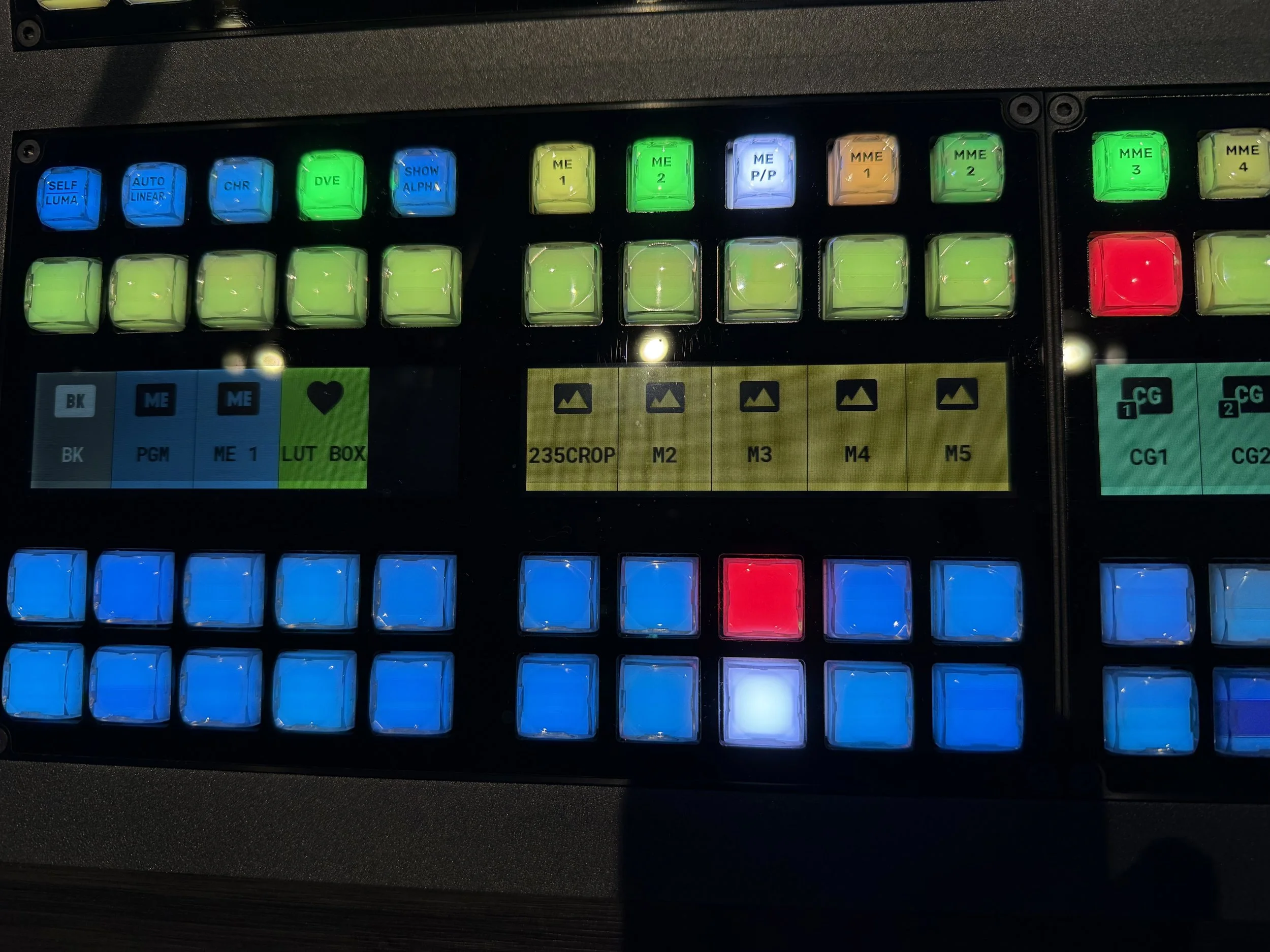
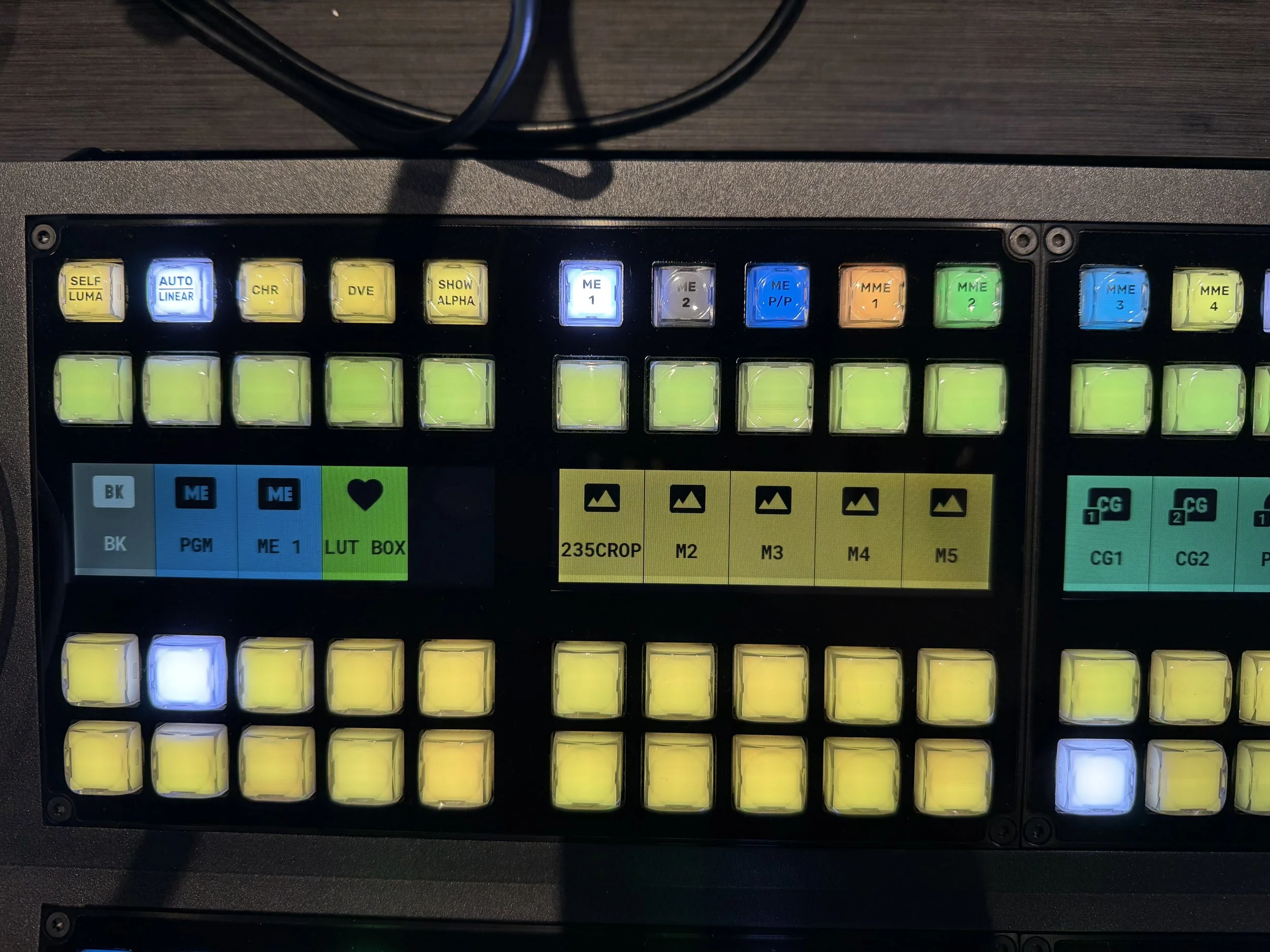
BOTTOM ME SET TO ME P/P and should appear BLUE
TOP ME SET TO ME1 and should appear YELLOW
CHECK AUX SENDS
With AUX sends, the broadcast switcher is able to quick route any input into the switcher to any of the 8 Aux sends. The white row of buttons ABOVE program bus are the keys used for auxes. So change an aux send, select which aux needing to change, then select a source.
AUX 1: CONF : STGDSP
STGDSP is the shift behind CG1
CONFIDENCE DISPLAY IS THE 90” OVER THE CENTER WALKWAYAUX 2: 2CONF : PGM
2CONF IS THE CONFIDENCE DISPLAY ON THE FLOOR BEHIND THE CAMERA RISERAUX 3: LED : ME1
AUX3 is the feed to the Side Screens.
We are sending ME1 or the top ME, to the side screens.AUX 4: CLN : CLN
AUX 5: PGM : PGM
AUX 6: BOH : CLN
BOH Embed is what TVs in Green Room and Baptism Changing Rooms will see. It's typically set to ME1
CHECK ME1 PGM & PRV
KEY 1: CG1
KEY 2: CAM1
KEY 3: 235 CROP
KEY 4: FOH CG
KEY 5: CG2
KEY 6: CG1
CHECK ME1 PGM & PRV
ME1 (TOP ME) PGM BUS set to PGM
ME1 (TOP ME) PRV BUS set to BLK
CHECK ME1 TRANSITION PANE
MAKE SURE BKG IS SELECTED
MAKE NOTE OF SOUNDCHECK
Video Directors MUST know which worship team member is singing the different parts of the songs
ENABLE TOUCH LOCK BUTTON ON BOTH M/E
END OF SOUND CHECK
Key Signage Off, Take Signage
So that pre-roll will be displayed on side screens.
PRE-SERVICE
IN PLACES 10 Til
All team mates in place 10 til
Make sure cams are on comms
Ensure Cam 2 and Mobiles are powered on and connected.
SERVICE
GENERAL
Our style:
CUT cameras
DISSOLVE graphics
WORSHIP CUTS
**VD’s to be aware of camera of all camera shot styles in the camera of the guides.**
Fast songs/fast tempo 3-5 seconds per cut
Slow songs/slower tempo 4-7 seconds per cut
Catch WL at start of Verses/Choruses
Exhorts: Catch WL at the start of the exhorts, stay on camera 1 through exhort. (ok to cut off during prophetic singing)
Be dynamic with speed of cut.
Watch for jump cuts, or two cameras that have the same framing.
SERMON CUTS
VD to cut to another Cam at least once per minute.
DO NOT cut when scripture lower thirds are being read.
Altar Call
Normal worship cuts for altar call.
DO NOT show video of people getting prayer for privacy,
POST SERVICE
Once Producer gives cue, back to CG for either Lyrics or Pre-Roll
END OF DAY
Once altar call has ended and team brief is over
Take Black/Key Off
At end of day take Black, and Key off.
Put dust cover on console
Put dust cover on console.
Clean up area
Throw away run sheets, bottled waters, etx.